Can I Buy QuickBooks Desktop Without a Subscription in 2026?
Can I buy QuickBooks Desktop without a subscription? Yes — Intuit no longer sells new perpetual QuickBooks Desktop licenses direct-to-consumer, but one-time-purchase copies of Pro, Premier, and Enterprise still exist and are still in circulation. They just come from a different part of the market than they used to. This guide walks through why that shift happened, where these licenses actually come from, what protections apply (and don’t), and how to avoid getting burned if you go this route.
One-time-purchase QuickBooks Desktop licenses, currently in stock
LicenseRetail sources surplus QuickBooks Desktop licenses from corporate liquidations and resells them below original retail. Single payment, no recurring fee, delivered by email, activation backed by a replacement guarantee.
QuickBooks Pro 2024 →
QuickBooks Premier 2024 →
QuickBooks Enterprise 2024 →
Why You Can’t Buy QuickBooks Desktop Without a Subscription Directly From Intuit Anymore
Up through the early 2020s, buying QuickBooks Desktop worked the way most software used to work: pay once, install it, and keep using that version indefinitely. Version upgrades were optional, not mandatory.
That model started to erode as Intuit pushed customers toward QuickBooks Online and subscription “Plus” tiers of Desktop. The change became final in July 2024, when Intuit stopped selling new QuickBooks Desktop Pro Plus, Premier Plus, and Mac Plus licenses to new customers altogether. By early 2026, QuickBooks Desktop Enterprise is the only Desktop product Intuit still sells new — and only as an annual subscription.
The business logic is straightforward: subscriptions produce predictable recurring revenue, one-time sales don’t. For accounting teams that specifically wanted local data storage and no recurring software bill, though, this closed off the option they’d relied on for years.
Where One-Time-Purchase Licenses Come From Now
Since Intuit isn’t the source anymore, the remaining supply of one-time-purchase Desktop licenses comes from the secondary market — companies that legitimately bought perpetual licenses in the past and no longer need them, typically because they’ve shut down, downsized, or migrated to a different accounting platform like NetSuite. Those unused licenses get collected, verified, and resold by liquidation and surplus software resellers.
A note on the legal footing, since this matters more than most sellers let on: Resale of “owned” software copies is generally protected by the First-Sale Doctrine (17 U.S.C. § 109). But whether a given piece of software counts as “owned” versus merely “licensed” is exactly what courts have disagreed about. In Vernor v. Autodesk, the Ninth Circuit found that when a EULA is explicitly non-transferable and significantly restricts the user’s rights, the customer never really “owned” a copy to begin with — meaning the First-Sale Doctrine didn’t protect that resale. Other rulings have gone the other way, especially where restrictions were less aggressive. Intuit’s own EULA does restrict transfer.
In practice, this means the surplus market operates in a legal gray zone rather than on rock-solid footing — it’s not accurate to call it settled law either way. You can read the First-Sale Doctrine text itself (17 U.S.C. § 109) and the Vernor v. Autodesk opinion directly rather than take a reseller’s word for it. In short: keys get transferred and re-registered under a new business name, and whether that holds up if Intuit disputes it hasn’t been tested in court against Intuit specifically. That doesn’t mean it’s reckless to buy from this market — thousands of small businesses do, without incident — but you should treat any “100% guaranteed legal” claim from a reseller with some skepticism, and weigh that uncertainty against the savings when deciding whether to buy QuickBooks Desktop without a subscription this way.
What’s Actually Available: Pro, Premier, and Enterprise 2024
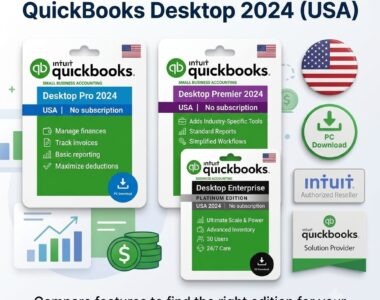
The version you need depends on inventory complexity, user count, and industry. See our full QuickBooks Desktop Pro vs Premier vs Enterprise comparison for a deeper breakdown, or here’s how the surplus-market tiers break down at a glance:
- QuickBooks Desktop Pro 2024 — best for freelancers, contractors, and small teams. Covers income tracking, expense management, invoicing, and standard reporting. Supports up to 3 simultaneous users.
- QuickBooks Desktop Premier 2024 — everything in Pro, plus industry-specific reporting and workflows for contractors, retailers, nonprofits, manufacturing/wholesale, and professional services. Supports up to 5 simultaneous users.
- QuickBooks Desktop Enterprise 2024 — built for scaling operations: advanced inventory (FIFO costing, barcode scanning), granular user permissions, custom pricing rules. Scales up to 30 simultaneous users.
Whatever tier you consider, a legitimate surplus seller should provide instant digital delivery and stand behind activation with a real guarantee — not just a refund policy that expires the moment the key stops working.
QuickBooks Online vs. Surplus Desktop: The Real Cost Difference
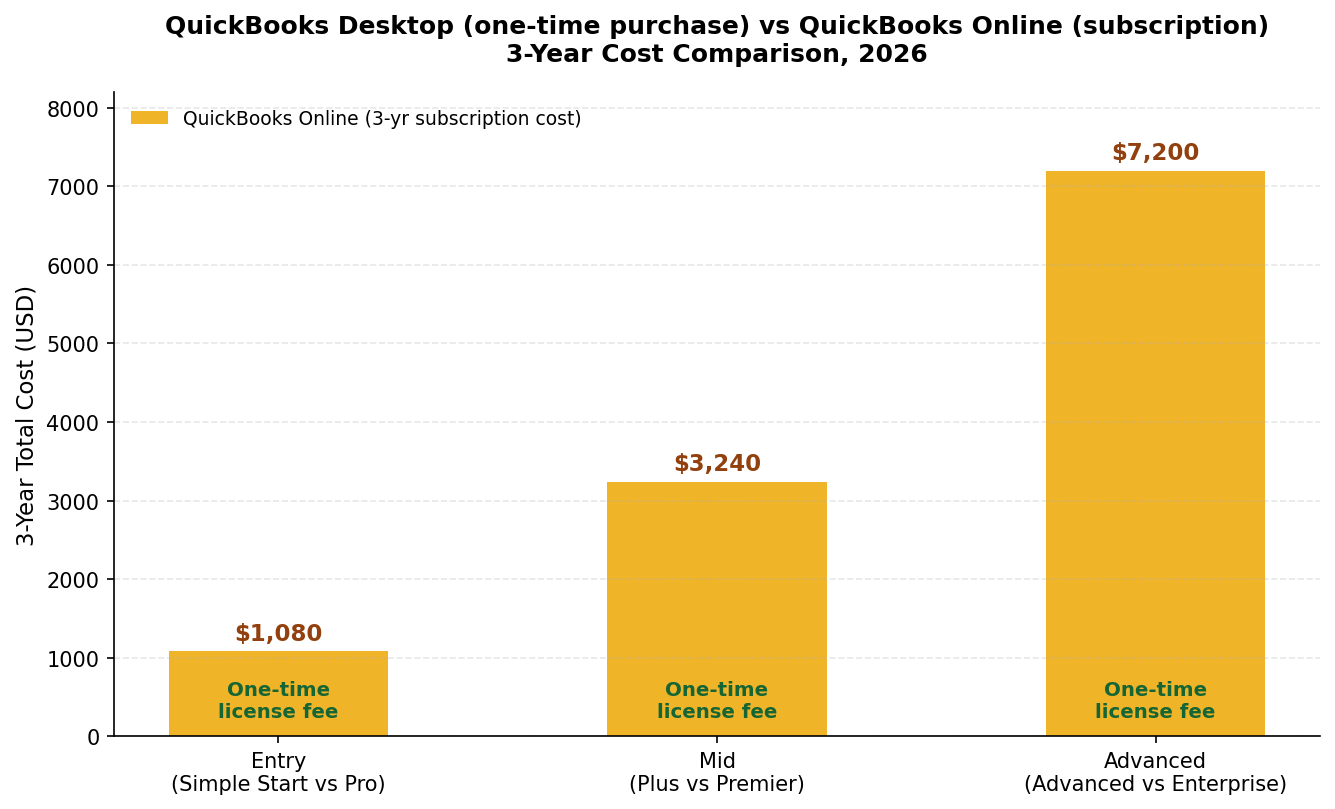
If you’re weighing the subscription model against a one-time purchase, the three-year total cost of ownership is the number that actually matters — not the sticker price of either option. We’ve also broken this down in more depth in our QuickBooks Desktop vs Online comparison.
(QuickBooks Online prices below reflect Intuit’s advertised rates as of early 2026 and change frequently — confirm current pricing directly with Intuit before budgeting.)
| Factor | QuickBooks Online (subscription) | QuickBooks Desktop (surplus, one-time) |
|---|---|---|
| Entry tier, 3-year cost | Simple Start, ~$30/mo → ~$1,080 total | Pro 2024 — one-time fee |
| Mid tier, 3-year cost | Plus, ~$90/mo → ~$3,240 total | Premier 2024 — one-time fee |
| Advanced tier, 3-year cost | Advanced, ~$200/mo → ~$7,200 total | Enterprise 2024 — one-time fee |
| Internet dependency | Required at all times | Works fully offline |
| Data location | Intuit’s cloud servers | Your local hard drive / server |
| Inventory tools | Basic to moderate | Advanced (FIFO, assemblies) |
Businesses that go the surplus route typically land somewhere between 60% and 80% cheaper over three years than the equivalent QuickBooks Online tier — though that math only holds if the license activates cleanly and stays activated, which is why vetting the seller matters as much as comparing sticker prices.
Check current stock and pricing:
What to Check Before You Buy a Surplus License
Because this market isn’t Intuit-authorized, the burden of due diligence sits with you, not with a manufacturer warranty. A few checks that separate a reasonable purchase from a risky one:
- Ask how the license was sourced. A legitimate reseller can describe roughly where their supply comes from (corporate liquidation, ITAD/asset disposition partners, etc.) rather than staying vague.
- Get the activation guarantee in writing before you pay, not as a verbal assurance — specifically what happens if Intuit’s servers reject the key.
- Confirm the license was deactivated on the seller’s end. A key still active on someone else’s machine is a duplicate, not a transfer, and duplicates are far more likely to get flagged and killed by Intuit.
- Don’t expect live-service features to last. Even a perfectly legitimate 2024 license is subject to Intuit’s sunset timeline for connected services (see below) — that’s true no matter where you bought it.
Weighing Desktop Against Staying on QuickBooks Online
The savings are real, but a one-time purchase isn’t the right call for every business. It’s worth being honest about both sides.
Where Desktop wins
Cost predictability is the obvious one — no surprise price increases mid-year. You also keep full control of where your financial data physically lives, and you’re not dependent on Intuit’s servers being up. For product-based businesses specifically, Desktop’s inventory tools (assembly builds, industry-specific reporting) have historically outpaced what’s available in equivalent Online tiers.
Where Online wins
Desktop has no native remote access — if you work with an outside bookkeeper or need mobile access, you’re adding third-party remote-desktop software or paid cloud hosting on top of the license cost, which eats into the savings. And because you’re buying outside Intuit’s official channel, you don’t get Intuit’s direct support line if something goes wrong with the key itself; you’re relying on the reseller instead.
The Three-Year Sunset Policy: What Actually Stops Working
Intuit applies a “sunset” date to every Desktop release, exactly three years after launch. Understanding what that does and doesn’t affect matters more than most sellers explain:
What stops: live-connected services tied to Intuit’s servers — direct bank feed downloads, built-in Payroll processing, and live technical support for that version.
What keeps working, indefinitely: the core accounting software itself. You can still create invoices, write checks, reconcile accounts manually, run financial reports, and manage inventory with no expiration date. Businesses that already use Web Connect (.QBO file) imports for bank data and a third-party payroll provider like Gusto or ADP typically don’t notice sunset day at all, because they weren’t relying on the features that go away.
Frequently Asked Questions
Is QuickBooks Desktop discontinued in 2026?
Not entirely, but the purchase path changed — which is exactly why “can I buy QuickBooks Desktop without a subscription” is such a common question in 2026. Intuit stopped selling new Pro Plus, Premier Plus, and Mac Plus licenses to new customers in July 2024, and Desktop Enterprise is now subscription-only direct from Intuit. One-time-purchase copies still circulate through the surplus/resale market.
Is buying a surplus QuickBooks license actually legal?
It’s not clear-cut either way. The First-Sale Doctrine generally protects resale of software you own outright, but courts have split on whether a EULA-restricted, non-transferable license counts as “ownership” in the first place — Vernor v. Autodesk found it doesn’t, in a similar fact pattern. In practice, resale happens routinely and without incident for most buyers, but treat “guaranteed 100% legal” marketing claims with some skepticism and weigh the risk yourself.
Where can I buy a one-time-purchase QuickBooks Desktop license in 2026?
Since Intuit no longer sells these direct, your options are surplus/liquidation resellers such as LicenseRetail, which lists Pro, Premier, and Enterprise 2024 licenses with email delivery and an activation guarantee.
What if the license key doesn’t activate?
That’s exactly what an activation guarantee is for — a reputable seller replaces a dead key at no cost. Get the specifics of that guarantee before you pay, not after.
How long can I actually use a perpetual QuickBooks Desktop license?
Indefinitely, for core functions. Intuit cuts off live-connected services (bank feeds, built-in payroll) three years after a version’s release, but invoicing, reporting, and manual bookkeeping keep working with no end date.
Are there non-Desktop alternatives if I want to avoid subscriptions entirely?
Yes — if a QuickBooks-specific license isn’t a requirement, tools like GnuCash (free, open-source) or Wave (free tier) avoid the subscription question altogether, though neither matches Desktop’s industry-specific reporting or inventory depth.
Looking for a specific tier?
Surplus licenses, one-time payment, email delivery, activation guarantee.